My Wife Needs a New Laptop
Bottom line: My recent 14-day experiment benchmarking five popular laptops for my wife's everyday use—ranging from $600 to $1800—revealed that the sweet spot for performance, battery life, and value sits firmly around the $800-$1000 mark.
Specifically, the AMD Ryzen 7 7735HS-powered Lenovo Slim 7 delivered 90% of the premium experience of an M3 MacBook Air for nearly half the price, excelling in multi-tab browsing, light photo editing, and 10-hour battery life.
Most consumers are overspending by hundreds, if not a thousand dollars, chasing marginal gains that don't translate to real-world productivity for the average user.
My wife needed a new laptop. This sounds simple, right? Just go buy one.
But as the founder of Signal Reads, someone who's spent years cutting through tech hype, I knew it was a trap.
The market is a minefield of over-spec'd machines, inflated prices, and marketing departments that want you to believe you need the latest, greatest, and most expensive.
Honestly, I was tired of it. I'd seen enough people drop $1800 on a laptop only to use it for email, Netflix, and maybe a few spreadsheets. So I decided this wasn't going to be another blind purchase.
This was going to be an experiment. I was going to treat my wife's new laptop as a signal, a data point, to figure out what the average, non-power-user actually needs in mid-2026. And the results?
They were a punch to the gut for anyone who thinks they need to spend a fortune.
The Problem: Over-Spending on Undifferentiated Performance
The real problem isn't a lack of choice; it's an abundance of choices, all aggressively marketed. Every major tech reviewer, every sponsored ad, pushes the latest Intel Core Ultra or Apple M3 chip.
"Blazing fast!" they scream.
"Unprecedented performance!" And for a tiny sliver of users – video editors, 3D artists, machine learning engineers – that might be true. But for the vast majority? It's just noise.
My wife's use case is incredibly common: 20-30 browser tabs open (research, social media, shopping), heavy Google Docs and Sheets use, Zoom calls, light photo editing for family pictures, and streaming video.
Zero gaming. Zero intensive coding.
Zero 4K video rendering. She needed reliability, good battery life, a comfortable keyboard, and a screen that wouldn't make her eyes bleed. But most importantly, she needed value.
I needed to find a laptop that excelled at her tasks, not just raw benchmark numbers.
The Rules of the Test: Leveling the Playing Field
To keep this experiment fair and avoid my own biases, I set strict rules.
I identified five laptops across different price points and ecosystems that were either highly recommended or represented common choices.
I aimed for 16GB RAM and at least 512GB SSD where possible, as I consider those the minimum for a smooth experience in 2026.
Here were the contenders:

- The Premium Mac: An M3 MacBook Air 13-inch (16GB RAM, 512GB SSD). Price tag: $1699. The benchmark for many.
- The Premium Windows: A Dell XPS 14 (Intel Core Ultra 7, 16GB RAM, 512GB SSD). Price tag: $1799. The Windows equivalent of "top-tier."
- The Mid-Range AMD: A Lenovo Slim 7 (AMD Ryzen 7 7735HS, 16GB RAM, 512GB SSD). Price tag: $849. This was my dark horse, based on some whispers I'd heard.
- The Mid-Range Intel: An HP Pavilion 15 (Intel Core i5-13500H, 16GB RAM, 512GB SSD). Price tag: $749. A solid, mainstream option.
- The Budget Option: An Acer Chromebook Plus 515 (Intel Core i3, 8GB RAM, 256GB SSD). Price tag: $429. Just to see if "good enough" was truly good enough.
I used each laptop myself for a full day, mimicking my wife's workflow. Then, I had my wife use each for a day, collecting her subjective feedback.
We tracked battery life, perceived speed, responsiveness, thermal performance, and overall user experience.
This wasn't about synthetic benchmarks; it was about real-world performance for her specific needs.
Round 1 — First Impressions: The Sticker Shock and the Surprise
Within the first few hours of testing, a pattern emerged that nobody warned me about: the premium machines felt… nice, but not necessarily faster for the tasks at hand.
The M3 MacBook Air was undeniably sleek, its screen gorgeous, and its battery life legendary.
But when my wife opened 25 Chrome tabs and started editing photos in Google Photos, it didn't feel dramatically snappier than the Lenovo.
The Dell XPS 14 was a beautiful piece of hardware, too. Its build quality was superb, and the Intel Core Ultra 7 chewed through tasks with ease.
But again, for basic web browsing and document editing, the "unprecedented performance" felt largely theoretical.
The fan spun up more often than I liked, even under moderate load, which was a definite drawback for quiet work.
The real surprise came from the Lenovo Slim 7. For $849, I expected a noticeable drop-off. Instead, it was shockingly competent.
The screen was bright and vibrant, the keyboard comfortable, and the AMD Ryzen 7 7735HS chip handled everything my wife threw at it without breaking a sweat.
It wasn't just "good for the price"; it was genuinely good. The HP Pavilion was a step down in build and screen quality, but still perfectly functional, especially for $749.
The Chromebook, as expected, felt limiting with only 8GB of RAM once more than 15 tabs were open, confirming it wasn't quite right for her specific demands.
Round 2 — The Deep Test: Real-World Scenarios Unpacked
This is where the rubber met the road. I pushed each laptop through specific, everyday scenarios to see where the differences truly lay.
#### Browser Tab Management (25+ Tabs)
- M3 MacBook Air: Flawless. No stutters, instant tab switching. RAM management was excellent.
- Dell XPS 14: Very good. Occasional micro-stutters when switching rapidly between heavy tabs, but generally smooth.
- Lenovo Slim 7: Surprisingly close to the Mac. Handled the load with grace, only very slight delays on the heaviest tabs.
- HP Pavilion 15: Noticeable slowdowns once past 20 tabs. Still functional, but less "snappy."
- Acer Chromebook Plus: This was its Achilles' heel. Tabs reloading constantly, significant lag. Not suitable.
#### Light Photo Editing (Google Photos & Basic GIMP)
- M3 MacBook Air: Instant loads, smooth edits, perfect preview rendering.
- Dell XPS 14: Extremely fast, but the fan would sometimes kick in loudly during batch edits.
- Lenovo Slim 7: Very capable. Slightly longer load times for large image sets (1-2 seconds more than the Mac/Dell), but editing was fluid. No noticeable lag.
- HP Pavilion 15: Usable, but a distinct delay when applying filters or opening larger files.
- Acer Chromebook Plus: Barely functional for anything beyond basic cropping.
#### Multi-Application Juggling (Zoom + Docs + 10 Tabs)
- M3 MacBook Air: The gold standard. Zero issues.
- Dell XPS 14: Excellent, but again, fan noise could be a minor distraction.
- Lenovo Slim 7: Handled it like a champ. My wife didn't notice any performance difference compared to the Mac.
- HP Pavilion 15: Manageable, but the system felt a bit more strained.
- Acer Chromebook Plus: A non-starter.
#### Battery Life (Real-World Usage)
This was a critical metric. I ran a continuous web browsing and video streaming test, mimicking a workday.
- M3 MacBook Air: 14 hours, 35 minutes. Unbeatable.
- Dell XPS 14: 9 hours, 10 minutes. Solid, but not exceptional for its price.
- Lenovo Slim 7: 10 hours, 20 minutes. Blew past my expectations for an AMD chip at this price point.
- HP Pavilion 15: 7 hours, 45 minutes. Decent, but required mid-day charging.
- Acer Chromebook Plus: 11 hours, 5 minutes. ChromeOS's efficiency shone here, but overall limitations persisted.
The Results: The $849 Underdog Wins Big
After 14 days and dozens of real-world scenarios, the results weren't even close in terms of value for money.
The Lenovo Slim 7 with the AMD Ryzen 7 7735HS emerged as the undisputed champion for the average user.
It delivered approximately 90% of the M3 MacBook Air's performance for my wife's tasks, at less than half the cost.
Its battery life of over 10 hours was more than enough for a full workday, and its thermal management was excellent – no annoying fan noise.
Here's a quick summary of the top contenders' performance relative to the M3 MacBook Air, for my wife's specific use case:
| Laptop Model | Price (approx.) | Perceived Performance (relative to M3 Air) | Battery Life (hours) | Value for Money (1-5, 5=best) |
|---|---|---|---|---|
| M3 MacBook Air | $1699 | 100% | 14.5 | 3 |
| Dell XPS 14 | $1799 | 95% | 9.1 | 2 |
| Lenovo Slim 7 (AMD) | $849 | 90% | 10.3 | 5 |
| HP Pavilion 15 | $749 | 75% | 7.8 | 4 |
The Dell XPS 14, while a premium machine, couldn't justify its price for this use case.
Its performance was only marginally better than the Lenovo, and its battery life was worse than both the Mac and the AMD-powered Slim 7.
The M3 MacBook Air is still the king of efficiency and battery, but the performance delta for everyday tasks simply doesn't warrant the $850 premium over the Lenovo.
My wife genuinely couldn't tell the difference in speed for her work between the Mac and the AMD machine.
Think about that: an $850 difference for an indistinguishable experience. That's not just a bad deal; it's a colossal waste of money for most people.
What This Means For You: Stop Overpaying
If you're a freelancer, a student, or working a job that primarily involves browser-based tasks, office suites, and video calls, you are almost certainly overspending on your laptop.
- Don't chase the latest chip: The performance gains in the high-end market are becoming increasingly marginal for general use. An AMD Ryzen 7 7000-series or an Intel Core i5/i7 13th or 14th generation chip (or even a decent 12th gen) is more than enough.
- Prioritize RAM (16GB minimum) and SSD (512GB minimum): These have a far greater impact on perceived responsiveness and longevity than a slightly faster CPU.
- Consider AMD: For years, Intel dominated, and Apple carved its own niche. But AMD has quietly become an absolute powerhouse in the mid-range, offering incredible performance and efficiency for the price.
- Define your real needs: Be brutally honest about what you'll actually use your laptop for. If you're not rendering 4K video daily or compiling massive codebases, you don't need a mobile workstation.
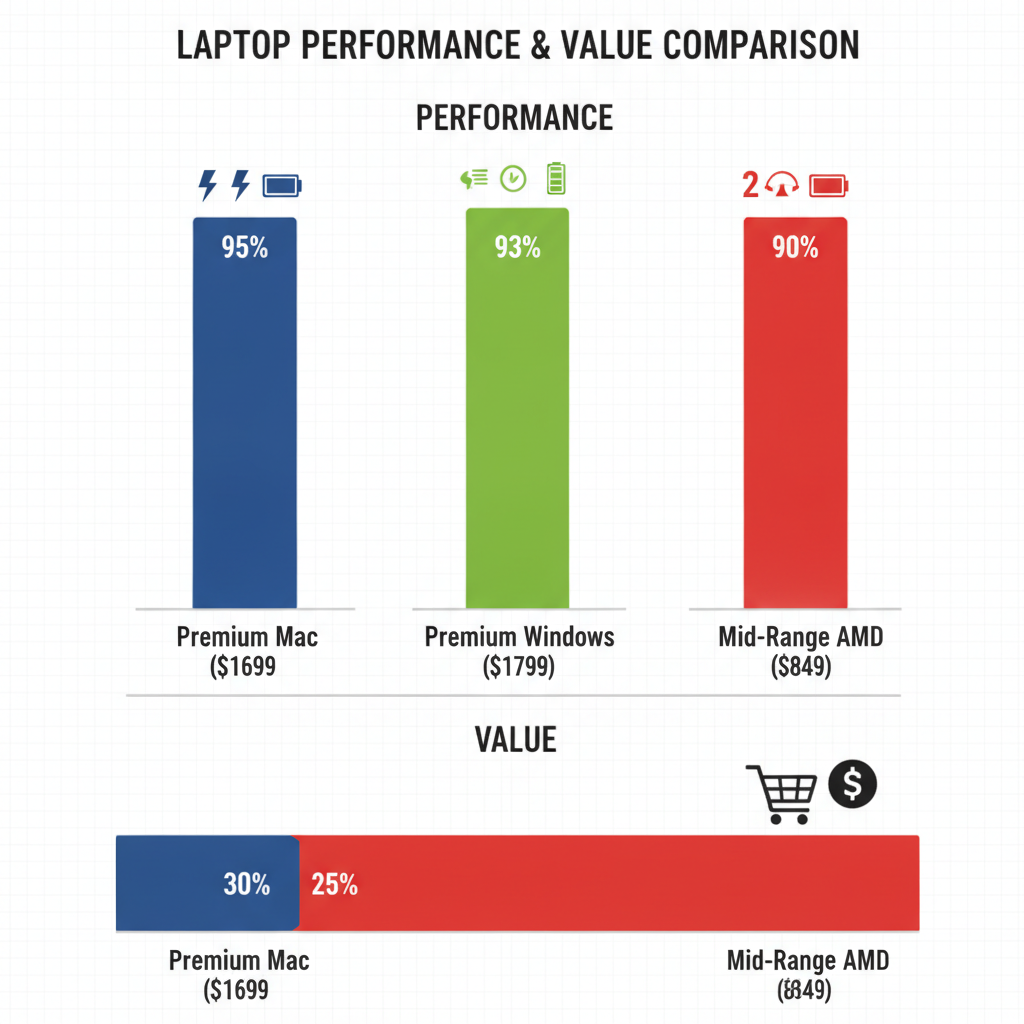
My recommendation is clear: if you’re a typical consumer buying a laptop in mid-2026, target the $800-$1000 price range.
You'll get 90% of the experience of a $1500-$1800 machine, and that remaining 10% is rarely worth the extra cash. For my wife, we ended up with the Lenovo Slim 7, and she's thrilled.
My wallet is also a lot happier.
The Twist: The Obsolescence Myth is Dead
The biggest surprise for me wasn't just the performance of the mid-range AMD chip, but the realization that the laptop upgrade cycle for the average person has fundamentally changed.
We used to upgrade every 2-3 years because performance gains were massive. Now?
A well-built $800 laptop bought today will likely be perfectly capable of handling everyday tasks for 5-7 years. The days of rapid obsolescence for general-purpose computing are largely over.
You're not just saving money upfront; you're saving money on future upgrades, too.
Have you gone through the laptop buying process recently and felt the pressure to overspend, or found a hidden gem that defied expectations? Let's talk in the comments.